
Intent, Line by Line
Why It Matters
Process control should not require a compiler.
It should not require exporting files.
It should not require vendor intervention.
If you understand your process, you should be able to express it directly.
Clearly.
Structurally.
Repeatably.
Recipes are where intent becomes execution.
Line-by-Line Control
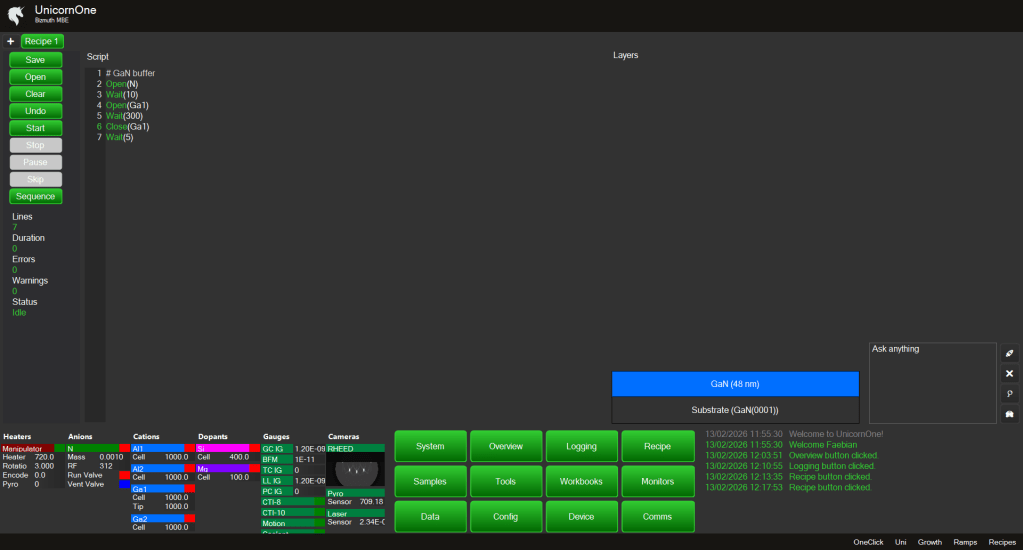
Recipes in UnicornOne are written as structured, readable pseudo-scripts.
No heavy compilation.
No hidden preprocessing.
What you type is what executes.
WYSIWYG process control.
Assisted Authoring
Right-click anywhere to:
- Access available commands
- Insert system-specific examples
- Reuse recently executed commands
The command list adapts to your configuration.
No memorizing syntax.
No digging through manuals.
Layer Sequence Visualization
As you write, a graphical layer stack grows alongside your script.
You don’t just see commands.
You see what you are building.
Add:
- 100 nm GaN
- 5 periods of AlGaN/GaN
- A doped cap layer
The sequence graphic updates automatically.
Script and structure remain aligned.
Add Layers — Generate Structure
You can “Add Layer” as a high-level instruction.
Example:
Add 100 nm GaN.
UnicornOne automatically generates the corresponding script block:
- Source open
- Ramp conditions
- Growth timing
- Stabilization
You stay focused on materials and structure.
The system handles mechanical detail.
Integrate Workbooks and AI/ML
Recipes can call Workbooks directly.
This enables:
- Guided calibration steps
- Conditional inspection routines
- Embedded AI/ML feedback loops
For example:
- Trigger RHEED analysis
- Adjust growth rate based on reflectance
- Pause for operator confirmation
- Apply anomaly detection during ramp
AI is not separate from execution.
It is callable.
Edit in Motion
You can:
- Add pauses
- Modify parameters
- Insert conditional checks
- Snapshot a RHEED image automatically
Recipes are structured — but not rigid.
They support real-world workflows.
Customizable Workflow
Every lab works differently.
Recipes support:
- Custom commands
- Device-specific extensions
- Workflow variations
- Macro integration
You can shape the control layer to match your process philosophy.
Not the other way around.
The Philosophy
A recipe is not just automation.
It is encoded knowledge.
It captures:
- Intent
- Method
- Assumptions
- Structure
Over time, it becomes institutional memory.
And because it is structured and logged, it becomes the foundation for:
- Optimization
- Reproducibility
- AI-driven feedback
- Autonomous experimentation
Execution should be transparent.
And powerful.
 Bizmuth